Note
Go to the end to download the full example code.
Side-by-side categories
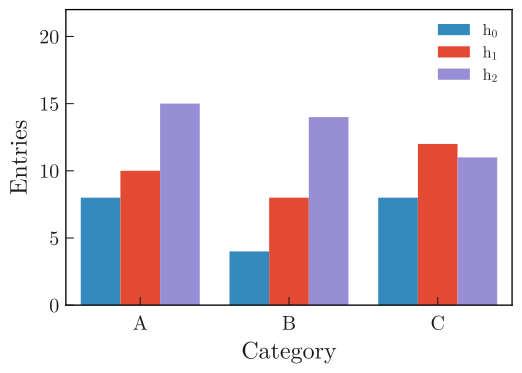
Plot multiple 1D histograms with categories side by side.
###
import boost_histogram as bh
import matplotlib.pyplot as plt
import numpy as np

from plothist import plot_hist

rng = np.random.default_rng(8311311)

# String categories
categories = ["A", "B", "C"]

# Axis with the 3 bins
axis = bh.axis.StrCategory(categories=categories)

## Works also with integers
# categories = [-5, 10, 137]
# axis = bh.axis.IntCategory(categories=categories)

# Generate data for 3 histograms
data = [
    rng.choice(categories, 20),
    rng.choice(categories, 30),
    rng.choice(categories, 40),
]

# Create and fill the histograms
histos = [bh.Histogram(axis, storage=bh.storage.Weight()) for _ in range(len(data))]
histos = [histo.fill(data[i]) for i, histo in enumerate(histos)]

labels = [f"$h_{{{i}}}$" for i in range(len(histos))]

# Plot the histogram
fig, ax = plt.subplots()

# Use a specificity of matplotlib: when a list of histograms is given, it will plot them side by side unless stacked=True or histtype is a "step" type.
plot_hist(histos, ax=ax, label=labels)

# Set the x-ticks to the middle of the bins and label them
ax.set_xlim(0, len(categories))
ax.set_xticks([i + 0.5 for i in range(len(categories))])
ax.set_xticklabels(categories)
ax.minorticks_off()
# Get nice looking y-axis ticks
ax.set_ylim(top=int(np.max([np.max(histo.values()) for histo in histos]) * 1.5))

ax.set_xlabel("Category")
ax.set_ylabel("Entries")
ax.legend()

fig.savefig("1d_side_by_side.svg", bbox_inches="tight")
Total running time of the script: (0 minutes 0.197 seconds)