Note
Go to the end to download the full example code.
Multiple comparisons
Compare two 1D histograms using the pull and ratio methods on the same plot.
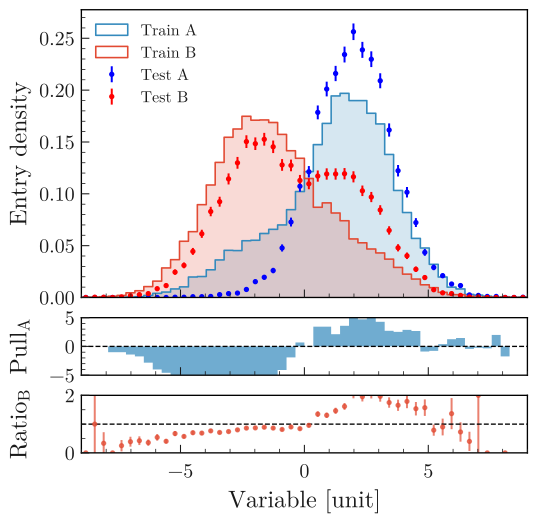
from plothist_utils import get_dummy_data

df = get_dummy_data()

###
from plothist import (
    create_comparison_figure,
    get_color_palette,
    make_hist,
    plot_comparison,
    plot_error_hist,
    plot_hist,
)

name = "variable_1"
category = "category"

x1 = df[name][df[category] == 1]
x2 = df[name][df[category] == 4]
x3 = df[name][df[category] == 3]
x4 = df[name][df[category] == 5]

x_range = (-9, 9)

h1 = make_hist(x3, bins=50, range=x_range)
h2 = make_hist(x4, bins=50, range=x_range)
h3 = make_hist(x1, bins=50, range=x_range)
h4 = make_hist(x2, bins=50, range=x_range)

# Create the 3 axes that we need for this plot
fig, axes = create_comparison_figure(
    figsize=(6, 6), nrows=3, gridspec_kw={"height_ratios": [5, 1, 1]}
)

# Assign each axes: 1 to plot the histograms and 2 for the comparison plots
ax_main, ax1_comparison, ax2_comparison = axes

# Get the red and the blue from the default color cycle
colors = get_color_palette("ggplot", 2)

# Here, we use step as a histtype to only draw the line
plot_hist(h1, label="Train A", ax=ax_main, histtype="step", linewidth=1.2, density=True)
plot_hist(h3, label="Train B", ax=ax_main, histtype="step", linewidth=1.2, density=True)
# And then, to make the plot easier to read, we redraw them with stepfilled, which add color below the line
plot_hist(
    h1, ax=ax_main, histtype="stepfilled", color=colors[0], alpha=0.2, density=True
)
plot_hist(
    h3, ax=ax_main, histtype="stepfilled", color=colors[1], alpha=0.2, density=True
)

# We plot 2 additional histograms with point style
plot_error_hist(h2, label="Test A", ax=ax_main, color="blue", density=True)
plot_error_hist(h4, label="Test B", ax=ax_main, color="red", density=True)

# First comparison is using pulls. We also change the color of the bars to make the plot easier to read
plot_comparison(
    h2, h1, ax=ax1_comparison, comparison="pull", color=colors[0], alpha=0.7
)
# Second comparison is using the default "ratio". Same strategy as pulls
plot_comparison(h4, h3, ax=ax2_comparison, color=colors[1], alpha=0.7)

# Harmonize the range of each axes
ax_main.set_xlim(x_range)
ax1_comparison.set_xlim(x_range)
ax2_comparison.set_xlim(x_range)

# Set the labels for the different axes
ax_main.set_ylabel("Entry density")
ax1_comparison.set_ylabel("$Pull_{A}$")
ax2_comparison.set_ylabel("$Ratio_{B}$")
ax2_comparison.set_xlabel("Variable [unit]")

# Add the legend
ax_main.legend(loc="upper left")

# Align the ylabels
fig.align_ylabels()

fig.savefig("1d_comparison_advanced.svg", bbox_inches="tight")
Total running time of the script: (0 minutes 1.091 seconds)